
Keyboard Switch Technology Comparison: Which Option Truly Performs Better?
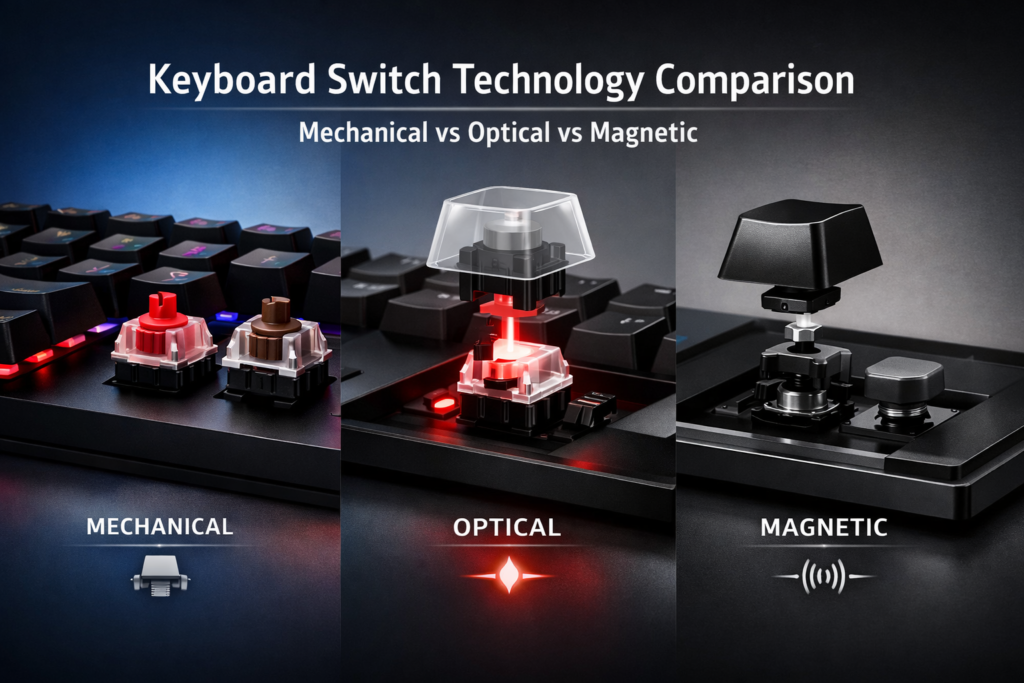
In the world of gaming and productivity, the choice of keyboard can make or break your experience. While some users may not give much thought to the technology behind their keypresses, others know that the switch inside their keyboard plays a major role in typing feel, performance, and even the lifespan of the device. Whether you’re looking for fast response times, smooth keystrokes, or long-lasting durability, understanding the nuances between mechanical, optical, and magnetic switches can help you make an informed decision. Let’s explore the subtle and not-so-subtle differences between these keyboard switch technologies.
Is There Really a Big Difference Between Mechanical, Optical, and Magnetic Switches?
When it comes to the experience of typing or gaming, the feel of the keys is crucial. The switches inside your keyboard determine how responsive each press is, how it feels under your fingers, and how quickly it registers. While most people are familiar with mechanical switches—think Cherry MX or similar—the rise of optical and magnetic switches has added complexity to the decision-making process.
Each switch type has its own set of advantages, challenges, and unique design characteristics that affect not only performance but also durability and comfort. Let’s break down what makes each switch tick (literally) and why one might be better suited for your needs.
Mechanical Switches: The Time-Tested Titan
Mechanical switches have been the go-to for both gamers and typists for decades. They are built using a metal contact mechanism that registers a keystroke when the two contacts meet. There’s a wide variety of mechanical switches on the market, such as Cherry MX, Gateron, and Kailh, each offering different tactile feels, actuation points, and keypress feedback.
- Feel: Mechanical switches come in three major variants—tactile, linear, and clicky. Tactile switches provide a bump when pressed, letting you know that the key has been activated. Linear switches offer a smooth, uninterrupted press, while clicky switches provide an audible click at the point of actuation. The choice is subjective and dependent on your typing preference.
- Durability: Mechanical switches are known for their robustness. A good-quality switch can last for 50 million keystrokes or more, making them incredibly durable.
- Customization: Mechanical switches allow for a great deal of customization, whether it’s the switch type or the keycaps you choose. This is a major selling point for keyboard enthusiasts and custom-build aficionados.
Magnetic Switches: A New Era of Silent Precision
Magnetic switches are an innovation that marries the best of mechanical design with the precision of magnetism. Instead of using traditional metal contacts to register keypresses, these switches use magnets to detect keystrokes.
- Feel: The experience of typing on a magnetic switch feels smooth and precise, with little to no tactile bump. The actuation is linear, making it ideal for people who prefer consistent, uninterrupted keypresses.
- Durability: Magnetic switches are incredibly durable, often outlasting mechanical switches. Because there’s no physical contact involved in the actuation, wear and tear are significantly reduced, leading to a longer lifespan (often 100 million keystrokes or more).
- Noise: Magnetic switches are generally quieter than mechanical switches. For those in shared spaces or who prefer a silent typing experience, these could be an ideal choice.
While magnetic switches have many benefits, they are still somewhat niche, so you may find fewer options available in mainstream keyboards. However, their silent nature and durability are making them a compelling option for certain use cases, like office work or even some competitive gaming setups.
Optical Switches: The Future of Speed and Responsiveness
Optical switches are a newer breed of keyboard switch technology that uses light to detect keypresses. This mechanism eliminates the need for metal contacts altogether, instead relying on light beams passing through sensors to register a keystroke.
- Speed: One of the biggest draws of optical switches is their speed. With the absence of physical contacts, optical switches are often quicker to register a key press, making them highly desirable for competitive gamers who need the fastest response times possible.
- Feel: Optical switches can vary in feel, but they tend to offer linear actuation, similar to mechanical switches without the tactile bump or audible click. This smoothness makes them comfortable for people who type or game for extended periods.
- Durability: Optical switches also excel in longevity, typically lasting for 100 million keystrokes or more. Since there’s no physical contact, there’s little friction or wear and tear, giving them an edge in durability.
While optical switches are great for speed, they do come with a downside. They often lack the same level of customization and personal feel that mechanical switches provide. They’re also typically used in more budget-oriented keyboards, though high-end options are starting to enter the market.
Breaking Down the Real-World Usage: Scenarios and Experiences
Let’s explore some real-world scenarios where the differences between mechanical, optical, and magnetic switches could make a tangible difference:
- Office Work: Magnetic switches are quiet, durable, and responsive, making them a great option for office environments. The lack of sound can keep you from disturbing others, and the long lifespan ensures you won’t be needing a replacement anytime soon.
- Long Typing Sessions: Mechanical switches, particularly tactile or clicky ones, are great for long typing sessions, especially for people who type regularly, like writers or programmers. The tactile feedback can reduce typing fatigue.
- Gaming: Optical switches shine in competitive gaming due to their speed. Whether you’re playing FPS or MOBA games, the almost instantaneous response time can be the difference between victory and defeat. Mechanical switches can also work well, but they tend to be slower by comparison.
Performance and Longevity: The Numbers Behind Each Switch Type
While personal preference and comfort are vital, let’s look at what the numbers say about each of these switches.
- Mechanical switches typically have a lifespan of 50–100 million keystrokes, depending on the switch. This ensures they last through years of heavy use, making them a reliable choice.
- Optical switches are noted for their extremely fast actuation times—often clocked at 0.2ms—making them ideal for gaming where every millisecond counts.
- Magnetic switches, with their contactless design, significantly extend the lifespan, often surpassing 100 million keystrokes, with less wear on the system compared to the other two types.
This data reveals that all three technologies are robust but differ in areas of speed, response time, and overall durability.
When the Switch Doesn’t Matter: A Counter-Perspective
For some users, the type of switch may not be as critical as other features of the keyboard. If you’re someone who primarily uses the keyboard for typing documents or checking emails, you might not notice the differences between these switches in day-to-day use.
In fact, the impact of the switch type is much more pronounced in specific use cases like gaming or long typing sessions. If you’re simply looking for a keyboard for casual browsing or light office work, any of these switches could do the job.
Reddit / User Reality: What Are Real Users Saying?
We scoured Reddit to see what real users have to say about each of these switches:
| User Type | Mechanical Switch Opinion | Optical Switch Opinion | Magnetic Switch Opinion |
|---|---|---|---|
| Gamers | "Love the tactile feel. Cherry MX Reds give me the best balance of speed and comfort." | "Optical switches are ridiculously fast! No more missed keystrokes in fast games." | "Magnetic switches are silent, but I'm still undecided on their feel for gaming." |
| Office Workers | "Sometimes too loud, but I love the feedback for typing long reports." | "Quiet and fast, definitely a good pick for office use." | "Smooth and quiet, perfect for my work environment!" |
| Casual Typists | "I'm used to mechanical switches, but the sound can be distracting." | "Optical switches feel a little too smooth for me." | "Magnetic switches are nice, but the lack of feedback is odd." |
While there’s a clear preference for mechanical switches in the gaming community due to the feel and reliability, office workers and casual typists often lean toward the quieter, more durable magnetic switches.
Which Switch Is Right for You?
Choosing the right switch depends on how you intend to use your keyboard. Here’s a quick guide to help you decide:
- For Typists: If you type a lot and want a satisfying experience with every key press, mechanical switches might be the best fit. Tactile or clicky switches offer great feedback, making typing more enjoyable and accurate.
- For Gamers: If you’re playing fast-paced games where split-second reactions matter, optical switches can give you the edge in speed. They register keypresses almost instantly, which can make a huge difference in competitive environments.
- For Quiet Work Environments: If you’re working in a shared space or just want a quieter typing experience, magnetic switches offer a good balance of smoothness and silence, while still providing excellent durability.
What’s Next for Keyboard Technology?
The evolution of keyboard switches continues, with manufacturers constantly pushing the boundaries of speed, feel, and durability. We’re likely to see hybrid systems that combine the best features of mechanical, optical, and magnetic technologies. Additionally, new materials and smart feedback systems could further enhance the experience, providing users with even more options tailored to their needs.
Vibetric Ending
As the world of keyboard technology continues to evolve, the choices available to users will only become more specialized and personalized. Whether you’re seeking ultimate speed, tactile feedback, or a silent typing experience, the future of keyboard switches is bright. The key to a perfect setup lies in knowing what fits your personal needs—whether you’re a gamer, a typist, or a professional.
Embrace the evolution of technology, and let your keyboard become an extension of your performance, no matter your use case.
Want to See How Keyboard Switch Technology Will Evolve in the Future?
- Follow vibetric_official on Instagram to stay up to date with the latest trends and insights into keyboard technologies, gaming gear, and more.
- Bookmark Vibetric.com we continuously update our analysis as new developments emerge in the world of keyboard technologies.
- Subscribe for updates and receive ongoing, in-depth breakdowns and expert opinions on the latest innovations in keyboard switches.
FAQs: Everything You Need to Know About Keyboard Switch Technologies
Optical switches use light for actuation, providing faster response times, while mechanical switches rely on physical contacts for a more tactile typing experience.
Yes, due to the lack of physical contact, magnetic switches generally have a longer lifespan compared to mechanical switches.
Optical switches are typically linear, meaning they lack the tactile bump of mechanical switches. This makes them smoother but less "satisfying" for some users.
Customization options for optical and magnetic switches are currently more limited compared to mechanical switches, which offer a wide range of choices in terms of feel and actuation.
Magnetic switches tend to be quieter than both mechanical and optical switches, making them ideal for quieter environments.
Yes, optical switches can have actuation speeds as fast as 0.2 milliseconds, which makes them ideal for competitive gaming, where speed is critical.
While optical switches can be fast and smooth, some typists may miss the tactile feedback of mechanical switches. It’s a matter of personal preference.
Magnetic switches are typically the longest-lasting, as they don’t rely on physical contacts to register keystrokes, minimizing wear and tear over time.
What’s your take on this?
At Vibetric, the comments go way beyond quick reactions — they’re where creators, innovators, and curious minds spark conversations that push tech’s future forward.